Every shot from every guest.
One QR code on the tables. Guests add photos and short videos from their phones, no app needed, and you get the whole event in one album.
Free for up to 5 guests. Paid plans from $28 per event, paid once.
Got an album code? Join with it

How it works
- 1
Make the album
Name it, pick a plan, and print the QR card for the tables. It takes a minute.
- 2
Guests scan and shoot
No app and no sign-up. They type their name, then shoot straight into the album or add photos and short videos from their phone.
- 3
Relive it together
Pick favorites, comment, and watch new shots land on the big screen. Download everything after.
Made for the night and the morning after
The album fills up while the party is on, and it is all there to relive when it is over. Here is the demo album, as the couple and their guests see it.
One album, every guest
Everyone's photos and videos land in one album that looks like a profile they already know. It fills up while the party is on.


Picks and comments
Double-tap a photo to pick it, reply to comments and react with an emoji, as on Instagram.


On the big screen
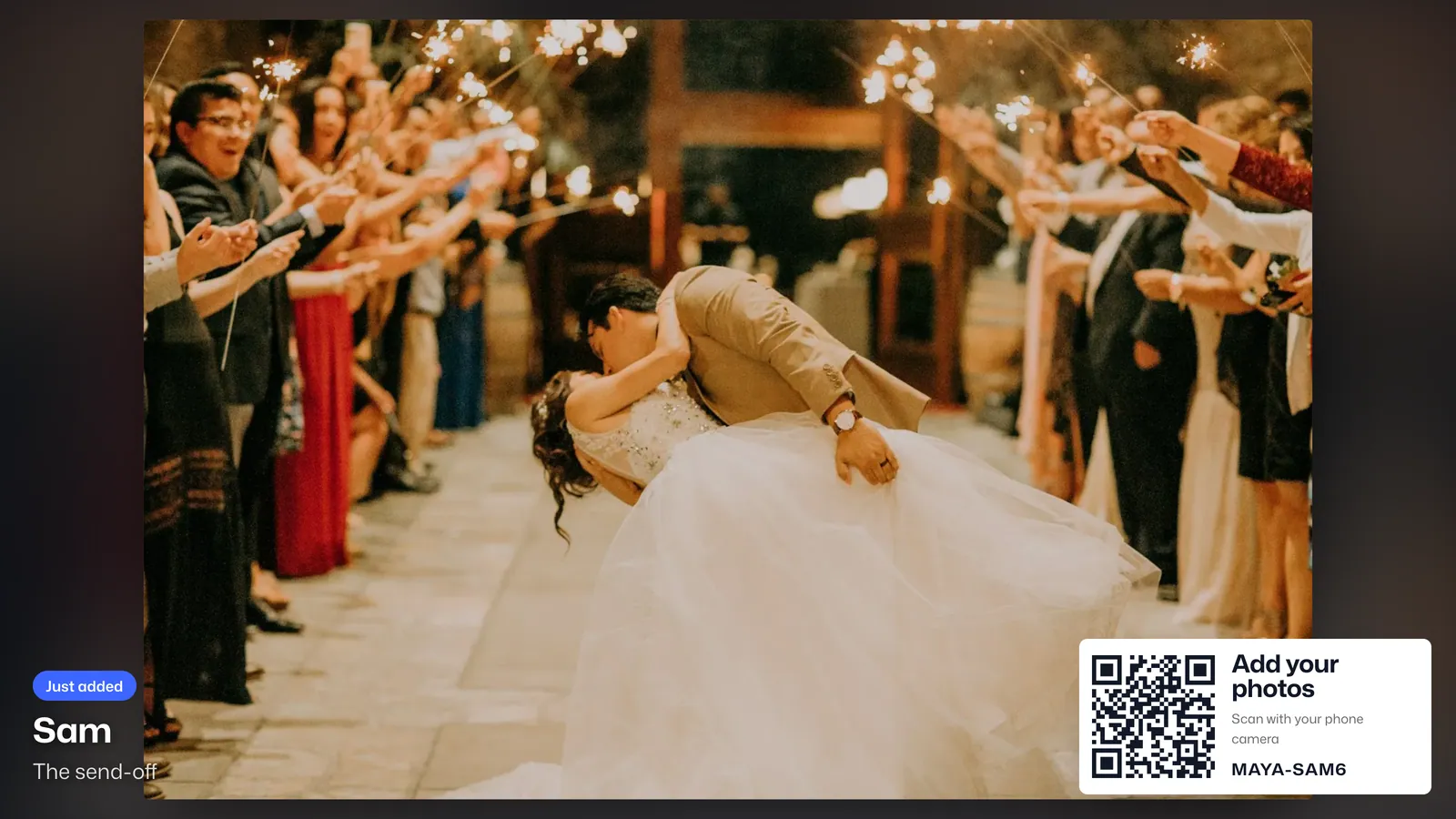
Open the album on a TV or projector. New photos and clips play as guests add them, with guestbook notes in between. The QR code in the corner lets anyone join from their seat.
Guestbook
Guests leave you notes, with one of their photos pinned on if they like. The notes play on the big screen too.


The favorites first
The most-picked photos rise to the top of their own page, so the morning after starts with the best ones.


Short videos
Clips up to 60 seconds, straight from the phone. We make a copy that plays everywhere.
Your order, your rules
Drag photos into the story you want to tell, pause uploads, or keep the album private to hosts.
Everything, full size
One zip with every photo as it was shot, every video and the guestbook. Video originals are kept for 90 days, then a sharp 1080p copy. Location data is removed from all of it.
For every kind of event
- WeddingsEvery table, the reception screen and a guestbook for the two of you.
- BirthdaysEvery photo of the candles, from everyone who was there.
- Baby showersPhotos of the games and gifts, and notes for the parents-to-be.
- Bachelorette partiesOne private album for the whole weekend, from every phone in the group.
- GraduationsThe ceremony and the party, from every relative with a phone.
- Family reunionsEvery generation, new photos and old ones, in one family album.
- Company eventsHoliday parties, offsites and launches, private to the organizers if you like.
- ConferencesAttendee photos for the lobby screens and the recap, from badge to closing talk.
Pay once per event
No subscription. Start free and upgrade whenever the guest list grows; you only pay the difference.
| Plan | Price | Guests | Storage | Album open |
|---|---|---|---|---|
| FreeTry it with a few friends | Free | 5 | 0.5 GBabout 150 photos or 3 minutes of video | 5 days |
| PartyBirthdays, dinners, get-togethers | $28 | 50 | 10 GBabout 3,000 photos or 65 minutes of video | 30 days |
| CelebrationShowers, reunions, milestones | $59 | 100 | 25 GBabout 7,500 photos or 2.5 hours of video | 6 months |
| PremiumWeddings and big celebrations | $79 | 200 | 50 GBabout 15,000 photos or 5.5 hours of video | 1 year |
| UltimateLarge weddings and company events | $98 | 500 | 75 GBabout 23,000 photos or 8 hours of video | 2 years |
| GalaxyFestivals, conferences and brand events | $599 | 5,000 | 150 GBabout 46,000 photos or 16.5 hours of video | 5 years |
Questions
Do guests need an app or an account?
No. They scan the QR code or open your link, type their name, and start adding photos and videos in the browser. They can add an email later to keep access on another phone.
Can guests add videos?
Yes, clips up to 60 seconds. Videos share the album's storage with photos: a minute of phone video takes about as much room as 45 photos. We keep each video's original for 90 days; after that the album keeps a high-quality 1080p copy, which takes less room and is what downloads include.
How much storage do we need?
Photos and videos are kept as they were shot. A phone photo is about 3 MB and a minute of video about 150 MB, so 10 GB holds about 3,000 photos or 65 minutes of video. If you run out, upgrade and pay only the difference.
How long can we see the photos?
From the event date, for as long as your plan says: 5 days on Free, up to 5 years on Galaxy. When it ends, guests lose access and you have 14 more days to download everything before it is deleted.
What if we run out of guest spots or space?
New guests or uploads pause until you upgrade. Upgrading takes a minute and you only pay the difference between plans.
Who can see our album?
Only people who have your code or link. You can switch to private mode so guests see only their own photos, and you can get a new code at any time.
Is it a subscription?
No. You pay once per event, by card, through Stripe.